
Top up OpenRouter with more checkout options.
Works across



 and
and

 Bitcoin Lightning
andBitcoin Lightning1Credit
min top-up
2min
avg credited
208orders
last 30 days
Paste the payment link
How to get the OpenRouter payment link
e.g. https://payments.coinbase.com/payment-sessions/paymentSession_xxxx
1
Open OpenRouter → avatar (top right) → Credits (direct link), click to top up.
2
In Buy Credits, turn on the “Use crypto” toggle.
3
Click Purchase and copy the payment link.

1
Copy the generated Coinbase payment link (payments.coinbase.com/…).
2
Come back here, paste it into the box above, click “Pay with USDT/USDC”.
3
Check the amount (e.g. Pay 10.50 USDC to OpenRouter) before you send.
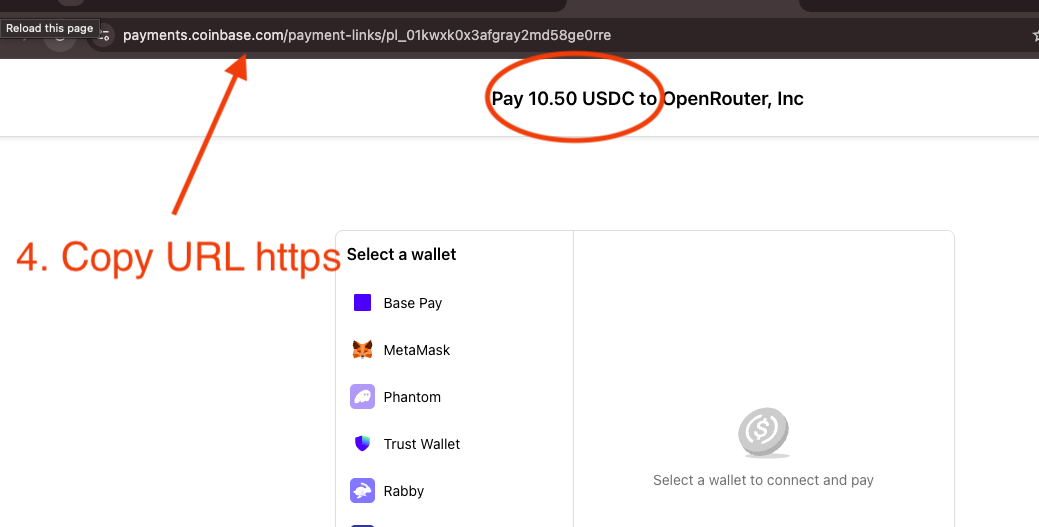
Video guide: Pay OpenRouter with more crypto
Supported services
Pay for these AI services with the coins you already have. Pick one to start.
 Venice AIPrivate AIvenice.ai
 QuickNodeBlockchain infrastructurequicknode.com
 PorkbunDomain registrarporkbun.com
 KoinlyCrypto tax trackerkoinly.io
 Compass MiningBitcoin mining hostingcompassmining.io
 AskSurfAI crypto researchasksurf.ai
 InterServerUS web hosting, VPS and dedicated servers — from $3/mo.interserver.net
 Command CodeCoding agent for open modelscommandcode.ai
 LLM GatewayOpen-source LLM API gateway with prepaid credits for 200+ models.llmgateway.io