
EN

How to Pay OpenRouter with USDT

OpenRouter bills in USDC, and its own crypto payment path charges 5%. But most people holding stablecoins hold Tether, not USDC. That is the mismatch this page exists to solve: you have the dollars, they are simply denominated in the wrong stablecoin, and the default route charges you 5% on top of asking you to convert first.

OpenRouter bills in USDC, but most people hold Tether, not USDC. If your stablecoin balance is in USDT, you do not need to swap it first. ROZO Checkout lets you pay OpenRouter with USDT and settles it to USDC for you.

USDT is supported on more than one network. Pick the chain your USDT already lives on and pay from there. ROZO currently charges no service fee while we validate the flow, so the amount you send is the amount that becomes credits.

This guide covers the exact steps, which networks carry USDT in the checkout, what else you can pay with beyond USDT, how long each route takes, and what to do if credits do not appear. OpenRouter is sometimes typed as Openrounter, Open Router, OpenRoute, or Openroutor. However you spell it, the same route applies.

Steps to pay OpenRouter with crypto: copy your OpenRouter payment link, paste it into ROZO Checkout, pick a chain, and pay.
Every method starts the same way: paste your OpenRouter payment link or payment ID into ROZO Checkout.

Does OpenRouter accept USDT directly?

Not as USDT. OpenRouter's balance is denominated in USDC, and its own crypto payment path charges 5%. So a Tether holder faces two obstacles rather than one: the wrong stablecoin, and a toll on the way in even after fixing it.

The conventional path is a swap. You send your USDT to an exchange or a DEX, swap it for USDC, withdraw the USDC onto a chain the payment path accepts, pay the withdrawal or network fee, wait, then top up and absorb the 5%. That is several fees and several waiting periods to convert one dollar into the same dollar with a different logo on it.

It is also the step where people lose money. Withdrawing USDT to the wrong network is the most common expensive mistake in stablecoin handling, and it happens most often exactly here, when someone is moving Tether between chains to satisfy a payment requirement.

ROZO Checkout removes the swap and the withdrawal. You connect the wallet that already holds your USDT, pick USDT on the network you hold it on, and approve inside your wallet. The settlement to the USDC that OpenRouter expects is handled for you. ROZO is independent and is not affiliated with OpenRouter, Coinbase, or Boltz.

What it costs

OpenRouter's own crypto payment path charges 5%.

ROZO currently charges no service fee while we validate the flow.

That is the whole comparison. The only remaining cost on any USDT route is the network's own gas fee, paid to the blockchain rather than to ROZO. On BNB Chain that is a small amount of BNB. On Solana it is a fraction of a cent in SOL.

There is no swap fee here, because you are not swapping. There is no bridge fee, because you are not bridging. Those are costs the conventional path imposes on you before you even reach the 5%, and they disappear entirely when you pay from the USDT you already hold.

Both sides of this are stablecoins, which makes the arithmetic clean. On a $1,000 top-up, the difference between a 5% path and a no-service-fee path is $50 of API credits that either exist or do not. Nothing about exchange rates, spreads, or slippage enters the picture, because USDT and the USDC OpenRouter bills in are the same dollar.

Because the order is priced in USDC, the USD value of what you owe is fixed at the moment the order is created. Paying in Tether credits the same amount.
Pay OpenRouter with USDT

  1. Paste your OpenRouter payment link or payment ID into ROZO Checkout.
  2. Connect the wallet that holds your USDT.
  3. Pick USDT on the network you hold it on, then approve the payment in your wallet.
  4. Credits are added automatically once the payment confirms. The order stays priced in USDC, so the USD value is fixed.

Step 1 is the one people ask about most. The payment link is generated on OpenRouter's side when you start a top-up, and it looks like a short identifier such as pl_01kyaaevc7evgt9. You can paste the full URL or just the identifier.

Step 3 is where mistakes get caught before they cost anything. A live balance check reads your actual USDT balance on the selected network, so if you are short you find out before signing rather than after a failed transaction. If the network you expected is not the one your USDT is on, Pay with another method lets you switch without starting over.

Step 4 happens inside your own wallet. Whatever wallet you connected shows you the transfer it is being asked to sign, including the token and the amount, so you can confirm it matches the order before approving. There is no ROZO account to create and no KYC form in the way.

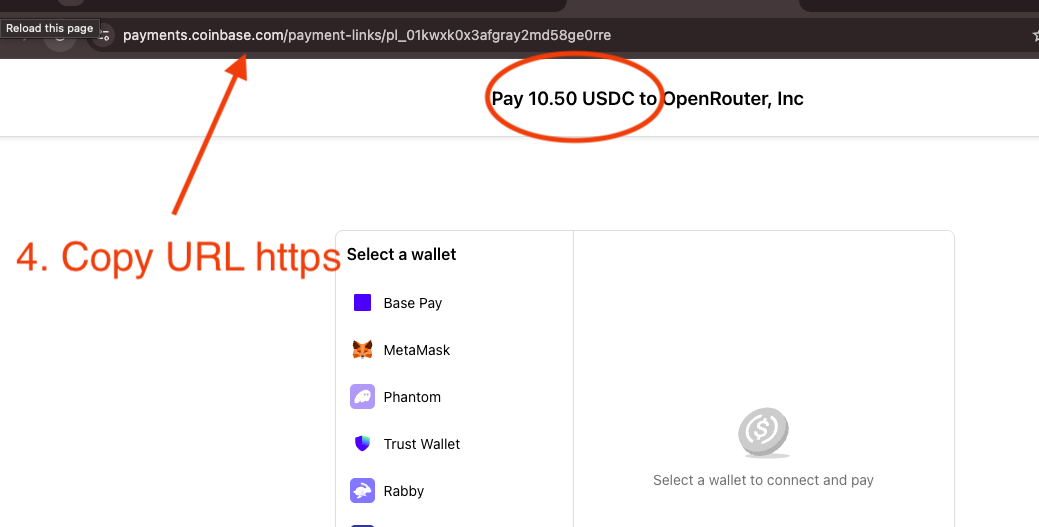
Copy the payment link from your browser address bar on the OpenRouter checkout page, and check the amount shown.
Step 2: on the OpenRouter payment page, copy the full link from the address bar and confirm the amount.

Which networks carry USDT

You can pay with USDT on BNB Chain (the BEP-20 version) or USDT on Solana, whichever you already hold. If you hold USDT on BNB Chain, see the BNB Chain guide for the exact steps. If it is on Solana, the Solana guide covers the wallet-connect flow. Either way, keep a little of the network's native coin (BNB or SOL) for the gas fee.

The important thing to understand is that USDT is not one token. It is a separate contract deployed on each network, and those versions are not interchangeable by sending. BEP-20 USDT and USDT on Solana are both Tether, both worth a dollar, and both accepted here, but they live in different wallets and move on different rails.

That is why step 3 asks you to pick the network. It is not a preference question, it is a factual one: where does your USDT actually sit right now? Open the wallet, look at which network the balance is displayed under, and choose that.

Both routes are wallet-connect flows. That means there is no deposit address to paste and no network dropdown in your wallet to get wrong at send time. Once you have connected the wallet that holds the balance, the checkout constructs the transfer against the correct contract for you. The wrong-network mistake that costs people the most money is simply not reachable inside the checkout.

What else can I pay with besides USDT?

This is where ROZO Checkout covers ground that USDT-only or stablecoin-only checkouts do not. USDT and USDC are the starting point, not the whole list.

ROZO Checkout accepts Bitcoin over the Lightning Network. Most crypto checkouts for AI API credits accept only USDT and USDC. ROZO also accepts Bitcoin over Lightning and USDC on Stellar, which means you can fund AI API credits from a Bitcoin balance or a Stellar balance without converting to a stablecoin on another chain first.

The Lightning route credits in about 3 minutes, works with any Lightning wallet, and the invoice shows the exact amount in sats before you confirm. It is Lightning only, not on-chain Bitcoin, and the invoice expires in about 60 minutes.

ROZO Checkout also accepts USDC on Stellar. Stellar confirms in a few seconds with fees that are a tiny fraction of a cent, which makes it the fastest and cheapest route on offer, and it is reachable at checkout.rozo.ai/stellar for people arriving from the Stellar community.

So the full picture is: Bitcoin over Lightning, USDC on Solana, USDT on Solana, USDC on Stellar, and USDT on BNB Chain. If you hold Tether, use USDT. If you hold Bitcoin or Stellar-native USDC, you are not locked out, which is the practical difference between this checkout and a stablecoin-only one.

Why it settles to USDC

OpenRouter credits are denominated in USDC. ROZO Checkout locks the USD value of your order and settles your USDT payment to USDC automatically, so paying in Tether credits the same amount. You never have to convert USDT to USDC yourself.

On a stablecoin-to-stablecoin route this mostly means one thing in practice: there is nothing to watch. You are not exposed to a price that could move between opening the payment window and approving the transaction, and there is no rate quote with a countdown on it. The order states an amount in USDC, you send that value in USDT, and that value becomes credits.

It also explains why USDT is accepted at parity here rather than being treated as a conversion you get charged for. The order's USD value is what is being satisfied, so sending USDT against a USDC-denominated order is a supported path, not a workaround.

The same logic extends to every other route. On Lightning the invoice is denominated in the exact number of sats that satisfies the USDC total, which is why Bitcoin moving while you scan does not change what you owe. On Stellar you send native USDC. In every case the USD value is fixed when the order is created.

How long it takes and if credits do not arrive

Credits are added automatically once the payment confirms. On USDT on Solana that is usually within about 30 seconds. On USDT on BNB Chain it lands after the BEP-20 transfer confirms, which is typically quick but depends on network conditions at the time.

If you are past that window, open your wallet's activity list and find the transfer. This single check resolves most cases. If the transaction is not there, the approval never completed, which usually means the wallet popup was dismissed or the native gas balance was too low. Nothing was sent and nothing was lost, so top up a little SOL or BNB and try again.

If the transaction is there but pending, it has not failed. On BNB Chain most wallets offer a speed-up option that rebroadcasts at a higher gas price.

If the transaction is there and confirmed, copy the transaction hash. Every wallet exposes it in the activity entry in one tap, and it is the definitive record of the amount, the token, and the destination.

Contact support with the transaction hash and your OpenRouter payment link or payment ID. Those two together identify both sides of the payment and are enough to trace and reconcile it. Do not send a second payment while waiting on the first, because a confirmed transfer cannot be reversed and you would simply have paid twice.

Is it safe, and who is ROZO?

Every USDT route in ROZO Checkout is a wallet-connect flow, which is the safest shape a crypto payment can take. Your keys never leave your wallet. The checkout constructs a transfer and asks your wallet to sign it, and your wallet shows you the token and the amount before you approve. Nothing moves without you pressing confirm.

That removes the single most expensive failure mode in stablecoin payments. There is no deposit address to paste, so you cannot paste the wrong one. There is no network to choose at send time, so you cannot send BEP-20 USDT to a chain that will not receive it. The transfer is built against the correct contract on the network of the wallet you connected.

ROZO Checkout does not hold a balance for you and there is no account to create. It is a payment surface that takes your OpenRouter payment link, accepts the stablecoin you already hold, and settles the result to the USDC that OpenRouter credits.

On pricing the position is stated plainly rather than buried, because cost is the entire reason people look for this route. OpenRouter's own crypto payment path charges 5%. ROZO currently charges no service fee while we validate the flow. If that changes it will be said out loud.

ROZO is independent and is not affiliated with OpenRouter, Coinbase, or Boltz. Coinbase Payments and Boltz appear under the hood on the Bitcoin Lightning route specifically, which is a different rail from the USDT ones described here.

Frequently asked questions

Which networks can I use USDT on?
You can pay with USDT on BNB Chain or USDT on Solana. Pick the network your USDT already lives on, since USDT is a separate contract on each network and the versions are not interchangeable by sending.
Do I need to swap USDT to USDC first?
No. ROZO Checkout settles your USDT payment to USDC automatically, so paying in Tether credits the same amount. The order is priced in USDC, which fixes the USD value regardless of which stablecoin you send.
How much does it cost to pay OpenRouter with USDT?
OpenRouter's own crypto payment path charges 5%. ROZO currently charges no service fee while we validate the flow. The only other cost is the network's gas fee, a small amount of BNB or a fraction of a cent in SOL, paid to the network rather than to ROZO.
Can I buy AI API credits with USDT?
Yes. You paste your OpenRouter payment link, connect the wallet holding your USDT, pick the network, and approve in-wallet. Credits are added automatically once the payment confirms, and the OpenRouter balance itself stays denominated in USDC.
Can I pay with something other than USDT or USDC?
Yes. Most crypto checkouts for AI API credits accept only USDT and USDC. ROZO Checkout also accepts Bitcoin over the Lightning Network and USDC on Stellar, so you can fund credits from a Bitcoin or Stellar balance without converting to a stablecoin on another chain first.
Is USDT on BNB Chain the same as USDT on Solana?
Both are Tether and both are accepted, but they are separate tokens on separate networks and cannot be sent from one to the other directly. Choose the network where your balance actually sits, which you can see in your wallet.
Do I need gas to pay with USDT?
Yes. Keep a little of the network's native coin in the wallet. On BNB Chain that is a small amount of BNB. On Solana it is a fraction of a cent in SOL. A wallet holding only USDT and no native coin cannot broadcast the transaction.
Can I send USDT to the wrong network by mistake?
Not inside the checkout. Both USDT routes are wallet-connect flows, so there is no deposit address to paste and no network dropdown to get wrong at send time. The transfer is constructed against the correct contract for the wallet you connected.
How fast do credits arrive when paying with USDT?
USDT on Solana usually credits within about 30 seconds. USDT on BNB Chain lands after the BEP-20 transfer confirms, which is typically quick but depends on network conditions. For reference, USDC on Stellar confirms in a few seconds and Bitcoin over Lightning credits in about 3 minutes.
I paid in USDT but no credits arrived. What do I do?
Open your wallet's activity list. If the transfer is not there, the payment never went out and you can retry after checking your gas balance. If it is there and confirmed, copy the transaction hash and contact support with it and your OpenRouter payment link or payment ID.

Pay OpenRouter with the crypto you already hold

Paste your OpenRouter payment link, pick your chain, and confirm in your wallet.

Open ROZO Checkout
