EN

How to Pay OpenRouter with USDC on Stellar

OpenRouter bills in USDC, and its own crypto payment path charges 5%. If your stablecoins already sit on Stellar, that 5% is being charged on money that is already USDC. You are holding the exact currency OpenRouter wants. It simply lives on a rail the default path does not reach.

The usual workaround is a bridge. You move USDC off Stellar onto whichever chain the payment path expects, pay the bridge fee, wait for it to land, and then top up and absorb the 5% anyway. For a stablecoin that already settles in a few seconds for a tiny fraction of a cent, that is a lot of ceremony to move a dollar from one place to another.

ROZO Checkout removes the bridge. You paste your OpenRouter payment link, choose USDC on Stellar, and pay from the Stellar balance you already hold. The settlement to USDC that OpenRouter expects is handled for you. ROZO currently charges no service fee while we validate the flow, so the amount you send is the amount that becomes credits.

This guide covers the exact steps, why Stellar is the fastest and cheapest route ROZO Checkout offers, what the trustline requirement actually means, how long credits take to appear, and what to do if something looks stuck. OpenRouter is sometimes typed as Openrounter, Open Router, OpenRoute, or Openroutor. However you spell it, the same route applies.

Steps to pay OpenRouter with crypto: copy your OpenRouter payment link, paste it into ROZO Checkout, pick a chain, and pay.
Every method starts the same way: paste your OpenRouter payment link or payment ID into ROZO Checkout.

Does OpenRouter accept Stellar directly?

Not as a Stellar payment. OpenRouter's balance is denominated in USDC and its own crypto payment path charges 5%. Holding USDC on Stellar does not exempt you from that, because the constraint is not which stablecoin you hold, it is which rail the payment arrives on and what toll sits on the route.

That produces a slightly absurd situation for Stellar users. You are holding a native, fully backed USDC. OpenRouter wants USDC. And yet the conventional path asks you to move that USDC to another chain first, paying a bridge fee and waiting on a bridge confirmation, only to then hand over 5% at the top-up screen. Two separate costs to deliver a dollar that was already the right dollar.

ROZO Checkout is a third-party checkout that sits in front of the OpenRouter payment link and accepts the asset you actually hold. You choose USDC on Stellar, you pay from your Stellar account, and the settlement to the USDC OpenRouter expects happens on ROZO's side rather than yours.

ROZO is independent and is not affiliated with OpenRouter, Coinbase, or Boltz. It does not present itself as an official OpenRouter payment method. It is a payment surface that takes crypto you already hold and delivers the USDC that credits your account.

What it costs

This is the part worth stating plainly, because for most people it is the entire reason to read a page like this.

OpenRouter's own crypto payment path charges 5%.

ROZO currently charges no service fee while we validate the flow.

On Stellar the only remaining cost is the network fee, and Stellar network fees are a tiny fraction of a cent. That fee is paid to the Stellar network, not to ROZO. There is no bridge fee in this route either, because nothing is bridged. Your USDC never leaves Stellar until it is settled on your behalf.

That makes Stellar the cheapest route available in ROZO Checkout by a comfortable margin. Solana's network fee is a fraction of a cent in SOL. BNB Chain costs a small amount of BNB. Lightning has a routing fee that is negligible on typical top-up sizes. Stellar's is smaller than all of them, and it is the one route where you can genuinely stop thinking about network cost entirely.

Because the order is priced in USDC, the USD value of what you owe is fixed when the order is created. USDC on Stellar is a native fully backed stablecoin, so the value you send is the value that credits your OpenRouter balance. There is no rate, no spread, and no countdown timer to beat.

Pay OpenRouter with USDC on Stellar

  1. Paste your OpenRouter payment link or payment ID into ROZO Checkout.
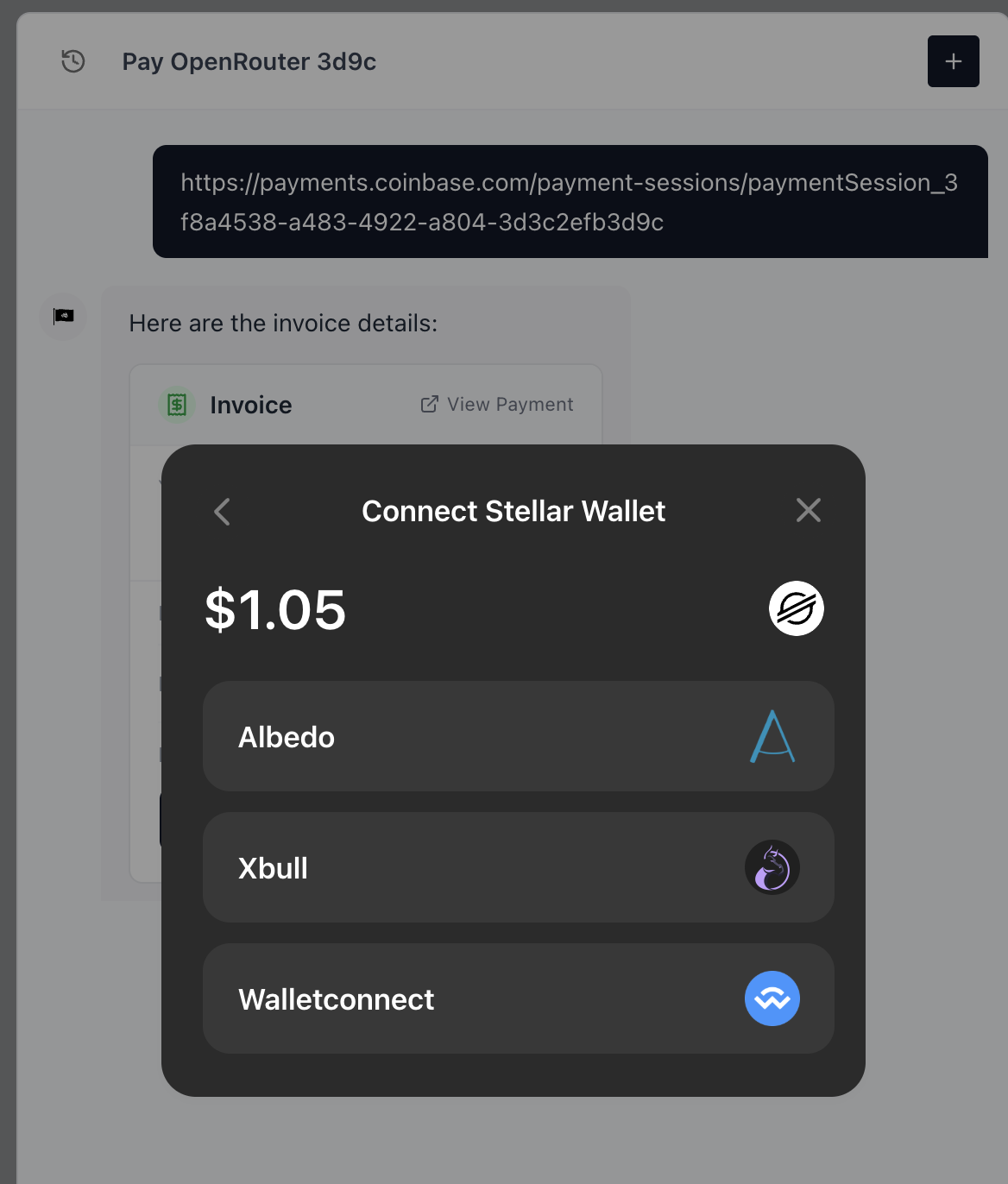
  2. Choose to pay with USDC on Stellar. The order shows who you pay and the exact USDC amount.
  3. Complete the Stellar payment from your wallet. Stellar transactions confirm in a few seconds.
  4. Credits are added automatically once the payment confirms.

The checkout is also reachable at checkout.rozo.ai/stellar, the Stellar community entry point.

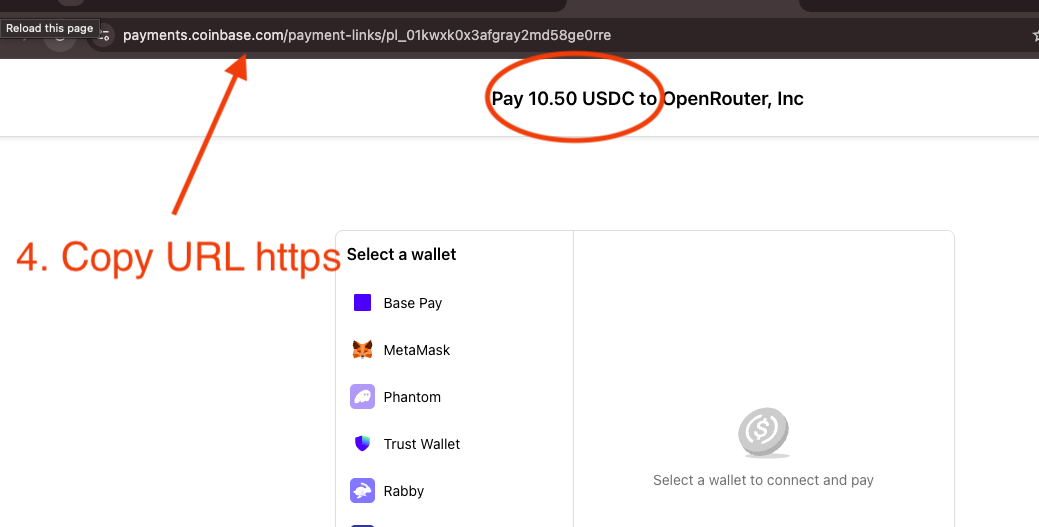
Step 1 is the one people ask about most. The payment link is generated on OpenRouter's side when you start a top-up, and it looks like a short identifier such as pl_01kyaaevc7evgt9. You can paste either the full URL or just the identifier, whichever is easier to get onto your clipboard.

Step 2 shows you the counterparty and the exact USDC amount before anything is signed. Read that line. It is your confirmation that the order you are about to pay is the order you created on OpenRouter, and it is the moment to catch a stale tab or a payment link copied from the wrong session.

Step 3 happens in your own wallet. There is no ROZO account to create, no email to verify, and no KYC form standing between you and a confirmed payment.

Copy the payment link from your browser address bar on the OpenRouter checkout page, and check the amount shown.
Step 2: on the OpenRouter payment page, copy the full link from the address bar and confirm the amount.
ROZO Checkout paying an OpenRouter order with USDC on Stellar
Pay your OpenRouter order with USDC on Stellar at checkout.rozo.ai/stellar.

Why Stellar for stablecoin payments

Stellar was built for moving money. Transactions settle in a few seconds and fees are a tiny fraction of a cent, so paying for AI credits costs you almost nothing in overhead. USDC on Stellar is a native, fully backed stablecoin, so the value you send is the value that credits your OpenRouter balance.

That last point matters more than it sounds. On some networks the stablecoin you hold is a wrapped or bridged representation, which means its value depends on a bridge continuing to behave. USDC on Stellar is issued natively on Stellar. There is no wrapper in the middle and nothing to unwind, which is part of why the settlement is so quick.

Stellar's design also explains the fee. The network charges a base fee per operation that is denominated in tiny fractions of an XLM, deliberately set low enough that payments of ordinary size are not economically discouraged. It was built as a payments network first rather than a general compute platform that later added payments, and the fee schedule reflects that.

For a use case like topping up API credits, that combination is close to ideal. You are making a small-to-medium payment that you want confirmed now, denominated in dollars, with no interest in paying for block space. Stellar is the route in ROZO Checkout that best matches that shape.

Which wallets and accounts work

You pay from your existing Stellar account holding USDC on Stellar. Whatever you already use to hold that balance is what you use here, and there is no ROZO-specific wallet to install anywhere in the flow.

The one Stellar-specific concept worth knowing is the trustline. On Stellar, an account must explicitly establish a trustline to an asset before it can hold that asset. In practice this is invisible to most people, because if you already hold USDC on Stellar then the trustline already exists by definition. It only becomes relevant if you are setting up a brand new Stellar account, in which case your wallet will walk you through adding the USDC trustline before any balance can arrive.

Stellar accounts also carry a minimum reserve requirement in XLM, and each trustline adds a small amount to that reserve. Again, if you are already holding USDC on Stellar, this is already satisfied. It is mentioned here only so that a fresh account does not surprise you.

Beyond that, there is nothing unusual. You are making a standard Stellar payment of USDC for the exact amount the order specifies. If your wallet supports paying a Stellar payment request, it supports this.

If you are arriving from the Stellar ecosystem rather than from an OpenRouter search, checkout.rozo.ai/stellar is the entry point built for you.

How long it takes

Stellar transactions confirm in a few seconds, and credits are added automatically once the payment confirms. That makes Stellar the fastest route ROZO Checkout offers.

For comparison across the other rails: Solana usually credits within about 30 seconds once the payment confirms on-chain, Bitcoin over Lightning usually credits in about 3 minutes, and BNB Chain lands after the BEP-20 transfer confirms, which is typically quick but depends on network conditions at the time. Stellar sits at the front of that list.

Because it is that fast, the honest advice is not to start troubleshooting early. If you have submitted the payment and the wallet has not yet reported a result, give it a moment. Stellar confirmations do not hang around in a pending state the way some networks do, so a payment either confirms quickly or it failed to submit at all, and the second case is visible in your wallet.

You do not need to keep the checkout tab in focus, click anything to finalize, or send a receipt to anyone. Credits are added automatically once the payment confirms.

If credits do not arrive

Start by confirming the payment actually went out. Open your Stellar wallet's transaction history and look for the USDC payment. This single check resolves most cases, because Stellar's speed means there is very little ambiguity: either the transaction is there and confirmed, or it was never submitted.

If the transaction is not there, nothing left your account and nothing was lost. The most common causes are a wallet session that timed out mid-signature, or an account that does not have the required XLM reserve free to submit an operation. Top up a small amount of XLM if needed and try again.

If the transaction is there and confirmed, copy the transaction hash. Every Stellar wallet exposes it in the transaction detail view, and it is the definitive record of the amount, the asset, and the destination.

Contact support with that transaction hash and your OpenRouter payment link or payment ID. Those two pieces of information together identify both sides of the payment and are enough to trace and reconcile it. Do not submit a second payment while you are waiting on the first, because a confirmed Stellar payment cannot be reversed and you would simply have paid twice.

One mismatch worth ruling out before anything else: make sure you sent USDC on Stellar rather than XLM or a different asset with a similar ticker. The order is denominated in USDC, and a payment in a different asset does not satisfy it.
Is it safe, and who is ROZO?

ROZO Checkout is a payment surface, not a custodial platform. It does not hold a balance for you, there is no account to create, and it never takes possession of your Stellar keys. You submit a Stellar payment from your own wallet for an amount that was displayed to you before you signed.

The amount is the thing to check, and the checkout puts it in front of you deliberately. Step 2 shows who you pay and the exact USDC amount. If that line matches the OpenRouter order you created, you are paying the right thing. If it does not, stop and reload the checkout with a fresh payment link.

On pricing the position is stated plainly rather than buried, because the cost is the entire reason people try this route. OpenRouter's own crypto payment path charges 5%. ROZO currently charges no service fee while we validate the flow. If that changes, it will be said out loud.

ROZO is independent and is not affiliated with OpenRouter, Coinbase, or Boltz. Coinbase Payments and Boltz appear under the hood on the Bitcoin Lightning route specifically, which is a different rail from this one. On Stellar you are making a direct stablecoin payment and the settlement to the USDC OpenRouter expects is handled for you.

If Stellar is not where your money lives, the other routes reach the same destination. USDC or USDT on Solana is a wallet-connect flow that credits in about 30 seconds. USDT on BNB Chain pays from the BEP-20 balance you already hold. Bitcoin over Lightning credits in about 3 minutes. All of them price the order in USDC and settle it for you the same way.

Frequently asked questions

How fast does a Stellar payment confirm?
Stellar transactions confirm in a few seconds, and credits are added automatically once the payment confirms. That makes Stellar the fastest route available in ROZO Checkout, ahead of Solana at about 30 seconds and Bitcoin over Lightning at about 3 minutes.
What does it cost to pay on Stellar?
Stellar network fees are a tiny fraction of a cent, so paying with USDC on Stellar adds almost no overhead. That fee goes to the Stellar network rather than to ROZO. OpenRouter's own crypto payment path charges 5%, while ROZO currently charges no service fee while we validate the flow.
Which stablecoin do I use on Stellar?
Use USDC on Stellar, a native fully backed stablecoin. The order is priced in USDC, so the value is fixed. Sending XLM or another asset does not satisfy a USDC-denominated order.
Do I need to bridge my USDC off Stellar first?
No. That is the whole point of this route. You pay from your Stellar balance and ROZO settles the payment to the USDC that OpenRouter expects, so there is no bridge hop, no bridge fee, and no bridge wait.
Do I need a trustline for USDC on Stellar?
If you already hold USDC on Stellar, the trustline already exists, because a Stellar account cannot hold an asset without one. It only comes up on a brand new account, where your wallet will walk you through adding the USDC trustline first.
Is USDC on Stellar the same as USDC on other chains?
It is a native, fully backed stablecoin issued on Stellar, not a wrapped or bridged representation. For the purposes of this payment it satisfies the same USDC-denominated order, so the value you send is the value that credits your OpenRouter balance.
Do I need a ROZO account to pay with Stellar?
No. You paste your OpenRouter payment link or payment ID, choose USDC on Stellar, and pay from your own wallet. There is no account to create, no email to verify, and no ROZO balance to fund first.
What is checkout.rozo.ai/stellar?
It is the Stellar community entry point to the same checkout. If you are arriving from the Stellar ecosystem rather than from an OpenRouter search, it takes you straight to the Stellar route.
I paid but no credits arrived. What do I do?
Open your Stellar wallet's transaction history and look for the USDC payment. If it is not there, nothing was sent and you can retry. If it is there and confirmed, copy the transaction hash and contact support with it and your OpenRouter payment link or payment ID.
Is ROZO affiliated with OpenRouter?
No. ROZO is independent and is not affiliated with OpenRouter, Coinbase, or Boltz. It is a third-party checkout that accepts the crypto you already hold and settles the payment to USDC.

Pay OpenRouter with the crypto you already hold

Paste your OpenRouter payment link, pick your chain, and confirm in your wallet.

Open ROZO Checkout