
Top up OpenRouter with Base
Works across Baseand
BaseandHow to get the OpenRouter payment link
e.g. https://payments.coinbase.com/payment-sessions/paymentSession_xxxx
1
Open OpenRouter → avatar (top right) → Credits (direct link), click to top up.
2
In Buy Credits, turn on the “Use crypto” toggle.
3
Click Purchase and copy the payment link.

1
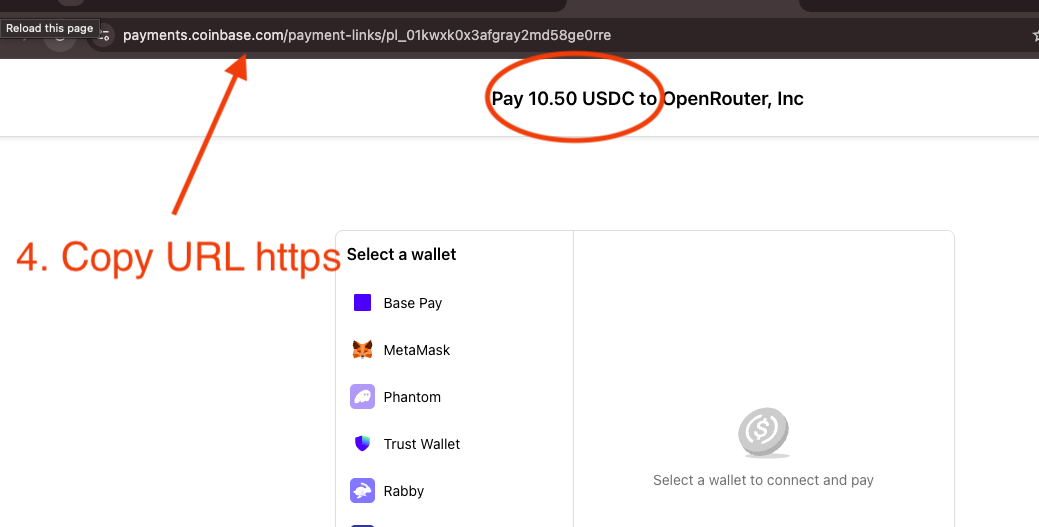
Copy the generated Coinbase payment link (payments.coinbase.com/…).
2
Come back here, paste it into the box above, click “Pay with USDC”.
3
Check the amount (e.g. Pay 10.50 USDC to OpenRouter) before you send.
Video guide
Supported services
Pay for these AI services with the coins you already have. Pick one to start.
 Venice AIPrivate AIvenice.ai
 fal.aiGenerative media APIs: image, video, audio and 3D models.fal.ai
 Command CodeCoding agent for open modelscommandcode.ai
 LLM GatewayOpen-source LLM API gateway with prepaid credits for 200+ models.llmgateway.io
 AlchemyWeb3 developer platform: RPC nodes, APIs and SDKs.alchemy.com
 QuickNodeBlockchain infrastructurequicknode.com
 PorkbunDomain registrarporkbun.com
 AskSurfAI crypto researchasksurf.ai
 KoinlyCrypto tax trackerkoinly.io
 Compass MiningBitcoin mining hostingcompassmining.io
 InterServerUS web hosting, VPS and dedicated servers — from $3/mo.interserver.net
Measured on Rozo — not a marketing number
Across 100+ completed Base USDC payments on Rozo (every service, production only, 2026-06-03 → 2026-09-01): median settle time 13s, 90th percentile 17s.
Which USDC works on Base?
Native USDC on the Base network — the token Coinbase withdraws by default. Funds on another chain? The checkout home also accepts Ethereum, BNB Chain, Solana and Stellar.
How fast does a Base payment settle?
Median 13 seconds from on-chain confirmation to final settlement, measured across 100+ real Base USDC payments in the last 90 days.
Sent it on the wrong network?
Don't pay twice. Follow the rescue guide first — most wrong-network transfers can be traced, some recovered. rescue.rozo.ai