EN

How to Pay OpenRouter with Bitcoin (Lightning)

OpenRouter bills in USDC, and its own crypto payment path charges 5%. If your money lives in Bitcoin, that is two problems stacked on top of each other: you are asked to convert first, and then you are charged 5% for the privilege of arriving.

OpenRouter gives you one API key for Claude, GPT, Gemini, and dozens of other models. But when it is time to add credits, Bitcoin users hit the same wall: the balance is priced in USD and paid in USDC, so if your money lives in Bitcoin you are stuck converting first.

ROZO Checkout removes that step. You can top up OpenRouter directly with Bitcoin over the Lightning Network, and it settles to USDC for you automatically. ROZO currently charges no service fee while we validate the flow, so the amount you send in sats is the amount that becomes credits.

This guide covers the exact steps, which Lightning wallets work, how long it takes, what happens if the invoice expires, and what to do if credits do not appear. Here is exactly how.

Steps to pay OpenRouter with crypto: copy your OpenRouter payment link, paste it into ROZO Checkout, pick a chain, and pay.
Every method starts the same way: paste your OpenRouter payment link or payment ID into ROZO Checkout.

Does OpenRouter accept Bitcoin directly?

Not as Bitcoin. OpenRouter's balance is priced in USD and paid in USDC, and its own crypto payment path charges 5%. So even where a crypto route exists, it is a USDC-shaped route with a 5% toll, not a Bitcoin one.

In practice that means the traditional path for a Bitcoin holder looks like this: send Bitcoin to an exchange, sell it for a stablecoin, withdraw that stablecoin onto a chain OpenRouter accepts, pay the network fee for that withdrawal, then top up and absorb the 5%. Every one of those steps is a place to lose time, lose a little value to spread, or make a mistake with a chain selection.

ROZO Checkout collapses that into one payment. You pay a Lightning invoice from the Bitcoin you already hold, and the settlement to USDC happens for you. There is no exchange account in the middle and no manual conversion step.

One important distinction: this is a Lightning path, not an on-chain Bitcoin path. You need a Lightning wallet. Sending on-chain Bitcoin to a Lightning invoice is not a thing that works, and the checkout will show you a Lightning QR code and an invoice string precisely because that is what it expects.

What it costs

OpenRouter's own crypto payment path charges 5%.

ROZO currently charges no service fee while we validate the flow.

That is the comparison in full. On Lightning specifically, the only other cost is the routing fee your own wallet pays to move the payment across the network, and on typical API top-up sizes that is negligible. It is also paid to the Lightning network by your wallet, not to ROZO.

What you will not be exposed to is price movement during the payment. The order is priced in USDC, and the invoice you scan is denominated in the exact number of sats that satisfies that USDC total at the moment the invoice was created. You confirm a specific number of sats and you receive a specific USDC-denominated credit. Nothing floats in between.

That is also why the invoice has an expiry. Roughly 60 minutes after it is generated it stops being valid, because the sats-per-USDC figure baked into it has a shelf life. If it lapses, you generate a new one and pay that instead.

Pay OpenRouter with Bitcoin (Lightning)

  1. Paste your OpenRouter payment link or payment ID into ROZO Checkout.
  2. Confirm the order, for example OpenRouter, Inc, 1.05 USDC.
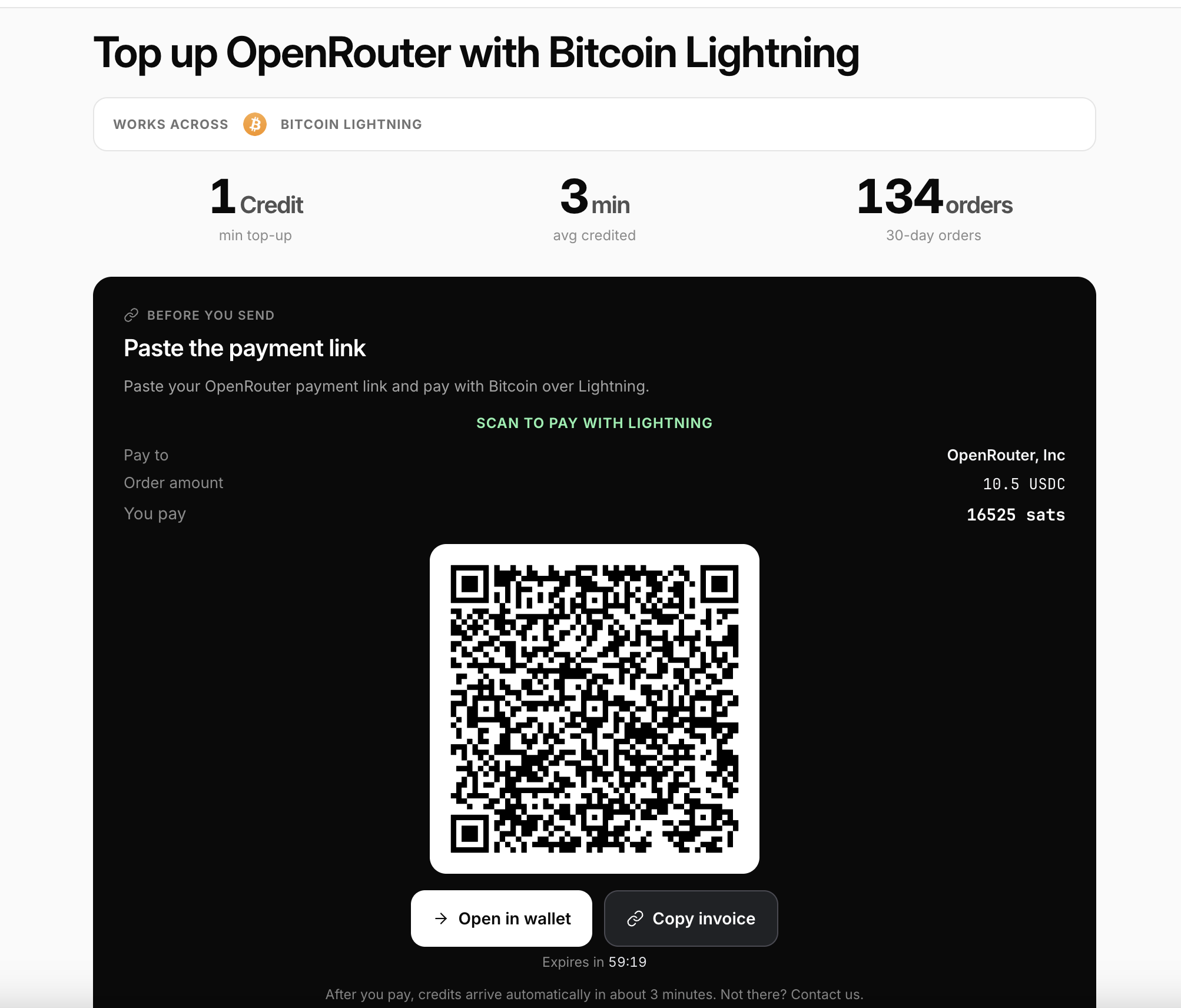
  3. Tap Pay with Bitcoin Lightning. A QR code shows the exact amount in sats.
  4. Scan it with any Lightning wallet such as Wallet of Satoshi, Phoenix, Muun, or Breez, or tap Open in wallet or Copy invoice.
  5. Confirm in your wallet. Credits usually arrive automatically in about 3 minutes.

The invoice expires in about 60 minutes, so pay while it is fresh. Use a Lightning wallet, not on-chain Bitcoin.

A note on step 4. If you are paying from a phone wallet while the checkout is open on the same phone, Open in wallet is the smoothest option because it hands the invoice straight to your installed wallet with no scanning. If the checkout is on a laptop and the wallet is on a phone, scan the QR. If you are pasting into a desktop wallet or a node interface, Copy invoice gives you the raw invoice string.

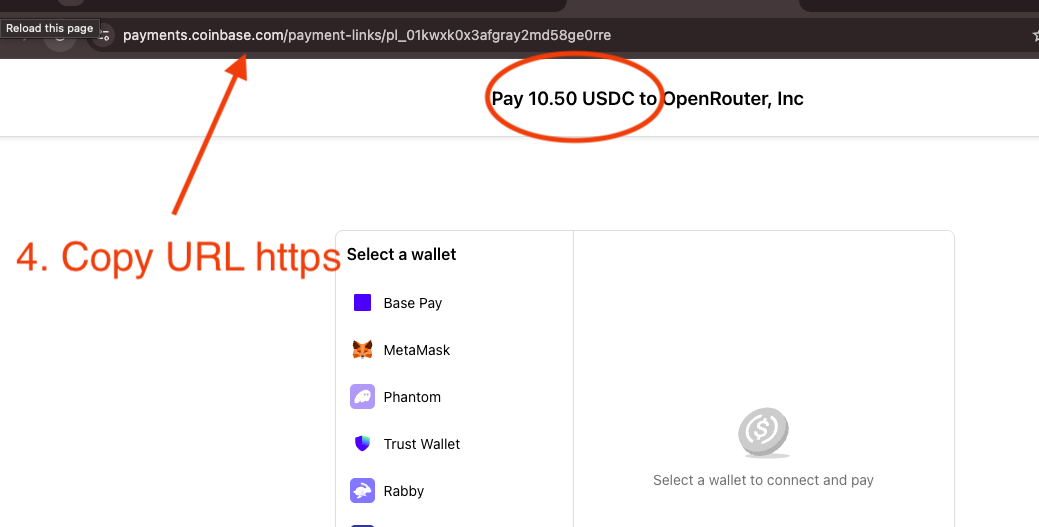
Copy the payment link from your browser address bar on the OpenRouter checkout page, and check the amount shown.
Step 2: on the OpenRouter payment page, copy the full link from the address bar and confirm the amount.
ROZO Checkout Lightning page: Scan to pay with Lightning, order amount 1.05 USDC, You pay in sats, a QR code, and Open in wallet and Copy invoice buttons
The Lightning page shows the exact amount in sats. Scan or copy the invoice, then confirm in your wallet.

Which Lightning wallets work

Any Lightning wallet works. The invoice is a standard Lightning invoice, so there is nothing ROZO-specific to install and no proprietary app in the path.

Wallet of Satoshi is the simplest option if you want to scan and go with no channel management at all. Phoenix is a good fit if you want a self-custodial wallet that still handles liquidity for you. Muun is a common choice for people who keep both on-chain and Lightning balances in one place. Breez works well for people who want a self-custodial node experience on a phone.

Hardware and desktop setups work too. If you run your own node or use a desktop wallet, use Copy invoice and paste the raw invoice string into whatever interface you normally pay from.

The one thing that does not work is an on-chain Bitcoin wallet or an exchange withdrawal that only supports on-chain sends. A Lightning invoice cannot be paid by an on-chain transaction. If your Bitcoin currently sits somewhere that only does on-chain sends, you will need to move some of it into a Lightning wallet first, or use one of the other ROZO Checkout routes such as USDC on Solana or USDC on Stellar instead.

How long it takes

Credits usually arrive automatically in about 3 minutes.

That window covers the Lightning payment settling and the resulting USDC settlement being applied to your OpenRouter balance. The Lightning leg itself is close to instant, which is the entire point of Lightning, but the credit appearing on the OpenRouter side is what most people are actually timing, and about 3 minutes is what to expect end to end.

The invoice expires in about 60 minutes. That is a separate clock and it runs from when the invoice is generated, not from when you first look at it. In practice this only matters if you open the checkout, get distracted, and come back much later. If that happens, do not pay the stale invoice. Reload the checkout with your payment link and let it generate a fresh one.

If you are at four minutes with no credits, that is still within reasonable variance, particularly if your wallet took a moment to find a route. If you are at fifteen minutes with a wallet that shows the payment as settled, that is the point to go and collect your payment record and contact support.

Why it is priced in USDC

The order is priced in USDC, so the USD value is fixed even though you pay in sats. Payments are powered by Coinbase Payments and Boltz under the hood, which is what settles your Bitcoin payment to USDC. You never have to convert manually first.

This is worth understanding because it explains the entire shape of the flow. OpenRouter expects USDC. You hold Bitcoin. Something has to bridge those two facts. In the manual path, you are that something: you open an exchange, you sell, you withdraw, you wait. In the ROZO path, Boltz handles the Lightning-to-stablecoin leg and Coinbase Payments handles the settlement side, and you experience it as a single QR code.

ROZO is independent and is not affiliated with OpenRouter, Coinbase, or Boltz. Those are the components in the path, named plainly, not endorsements or partnerships being implied.

The practical consequence for you is that the USD value of your top-up is decided the moment the invoice is created. Bitcoin can move while you are scanning and it does not change what you owe or what you receive, because the invoice already fixed the number of sats.

I paid but credits have not arrived

Start with the clock. Lightning credits usually arrive in about 3 minutes, so a payment that is one minute old has not failed.

Then check the two most common mismatches. The first is on-chain versus Lightning. If you sent on-chain Bitcoin rather than paying the Lightning invoice, the invoice was never paid, regardless of what left your wallet. The second is expiry. If the invoice was more than about 60 minutes old, a wallet may have rejected it outright, in which case nothing left your wallet and you simply need a fresh invoice.

If neither of those applies, collect your Lightning payment record. Every Lightning wallet keeps one, usually in the activity or history view, and it includes the payment hash or preimage along with the amount. That record is what proves the payment settled.

Keep your Lightning payment record and contact support with it, together with your OpenRouter payment link or payment ID. Those two pieces of information together are enough to identify the order and the payment and reconcile them. Do not pay the invoice a second time while waiting, because a settled Lightning payment cannot be reversed and you would simply have sent twice.

Ready to top up

Head to checkout.rozo.ai and pay OpenRouter with the Bitcoin you already hold. Paste your OpenRouter payment link, tap Pay with Bitcoin Lightning, and confirm in your wallet.

To recap what you are choosing between. OpenRouter's own crypto payment path charges 5%. ROZO currently charges no service fee while we validate the flow. The Lightning route takes about 3 minutes, works with any Lightning wallet, and settles to USDC for you so that the credits land without a manual conversion anywhere in the chain.

If your Bitcoin is not currently in a Lightning wallet and you would rather not move it, the other ROZO Checkout routes cover the same destination from different assets. USDC or USDT on Solana is a wallet-connect flow that takes about 30 seconds. USDC on Stellar confirms in a few seconds with fees that are a tiny fraction of a cent. USDT on BNB Chain works from the BEP-20 balance you already hold. All of them price the order in USDC and settle it for you the same way.

Frequently asked questions

How fast do credits arrive?
Lightning credits usually arrive automatically in about 3 minutes. That covers the Lightning payment settling and the resulting USDC settlement being applied to your OpenRouter balance.
How much does it cost compared to paying OpenRouter directly?
OpenRouter's own crypto payment path charges 5%. ROZO currently charges no service fee while we validate the flow. On Lightning the only other cost is your wallet's routing fee, which is negligible on typical top-up sizes and is paid to the network, not to ROZO.
Can I pay OpenRouter with Coinbase or Boltz?
Payments are powered by Coinbase Payments and Boltz under the hood, so yes, that is what settles your Bitcoin payment to USDC. ROZO is independent and is not affiliated with OpenRouter, Coinbase, or Boltz.
Which Lightning wallets work?
Any Lightning wallet works, such as Wallet of Satoshi, Phoenix, Muun, or Breez. The invoice is a standard Lightning invoice, so desktop wallets and your own node work too via Copy invoice. Use a Lightning wallet, not on-chain Bitcoin.
Can I send on-chain Bitcoin instead?
No. This is a Lightning path and a Lightning invoice cannot be paid by an on-chain transaction. If your Bitcoin only supports on-chain sends, move some into a Lightning wallet first or use another ROZO Checkout route such as USDC on Solana or USDC on Stellar.
Is the price locked?
Yes. The order is priced in USDC, so the USD value is fixed even though you pay in sats. The invoice is denominated in the exact number of sats that satisfies that USDC total, so Bitcoin moving while you scan does not change what you owe.
What happens if the invoice expires?
The invoice expires in about 60 minutes. If it lapses, nothing has been paid and nothing has been lost. Reload ROZO Checkout with your OpenRouter payment link and pay the fresh invoice it generates.
I paid but no credits arrived. What do I do?
Keep your Lightning payment record and contact support. Lightning takes about 3 minutes, so wait a little first. Send the payment record together with your OpenRouter payment link or payment ID, and do not pay a second time while waiting.
Do I need to convert Bitcoin to USDC first?
No. The settlement to USDC is handled for you. That is the entire reason the route exists, and it is why there is no exchange account or manual withdrawal step anywhere in the flow.
Do I need a ROZO account to pay with Bitcoin?
No. You paste your OpenRouter payment link or payment ID, tap Pay with Bitcoin Lightning, and pay the invoice from your own wallet. There is no account to create and no ROZO balance to fund first.

Pay OpenRouter with the crypto you already hold

Paste your OpenRouter payment link, pick your chain, and confirm in your wallet.

Open ROZO Checkout