आपका पैसा Bitcoin में है। OpenRouter USDC में बिल करता है और BTC नहीं लेता, इसलिए आम रास्ता यही रहता है: exchange भेजो, बेचो, withdraw करो, फिर top up करो।
अपना OpenRouter payment link ROZO Checkout में पेस्ट करें, Pay with Bitcoin Lightning पर टैप करें, और किसी भी Lightning wallet से invoice चुका दें। credits करीब 2 मिनट में आ जाते हैं। न कोई account, न exchange, न मैन्युअल conversion।
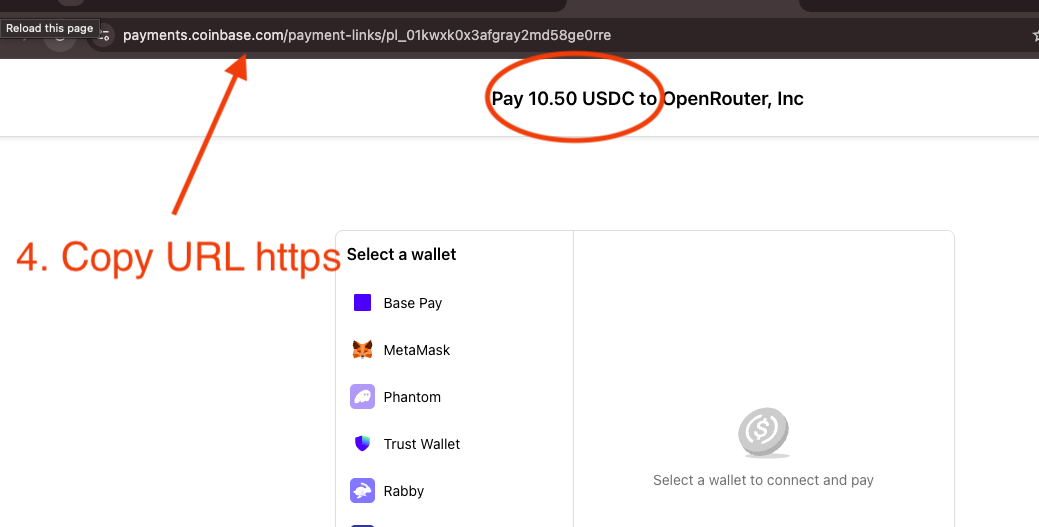
Watch the full walkthrough: paying OpenRouter with Bitcoin over the Lightning Network through ROZO Checkout.Every method starts the same way: paste your OpenRouter payment link or payment ID into ROZO Checkout.
OpenRouter को Bitcoin (Lightning) से पे करें
अपना OpenRouter payment link या payment ID ROZO Checkout में पेस्ट करें।
ऑर्डर कन्फर्म करें, जैसे OpenRouter, Inc, 1.05 USDC.
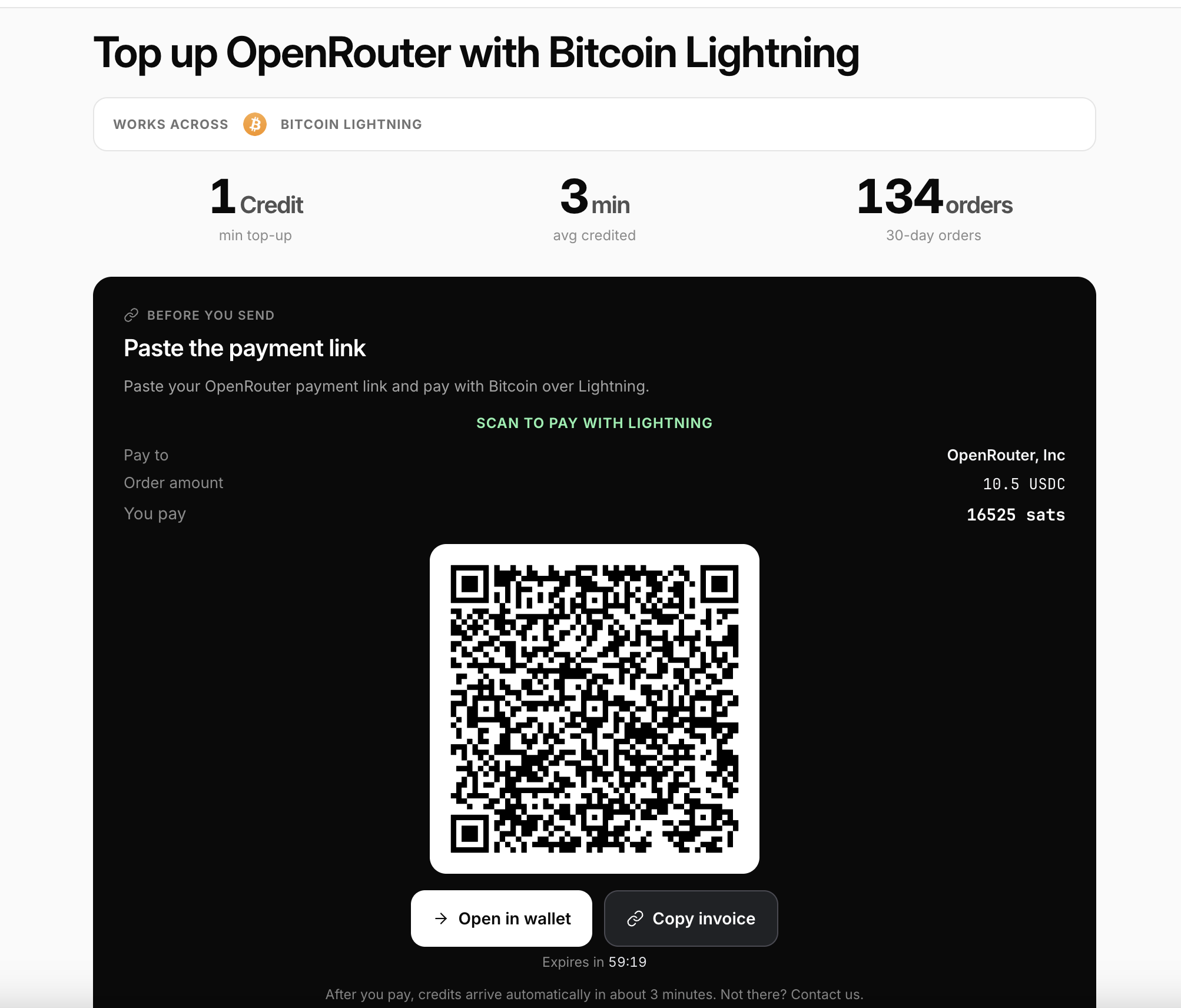
Pay with Bitcoin Lightning पर टैप करें। एक QR कोड sats में एक्ज़ैक्ट अमाउंट दिखाता है।
Wallet of Satoshi, Phoenix, Muun या Breez जैसे किसी भी Lightning wallet से स्कैन करें, या Open in wallet या Copy invoice पर टैप करें।
अपने wallet में कन्फर्म करें। Credits आम तौर पर करीब 2 मिनट में अपने-आप आ जाते हैं।
Invoice करीब 60 मिनट में एक्सपायर हो जाता है, इसलिए फ्रेश रहते हुए ही पे कर दें। Lightning wallet इस्तेमाल करें, on-chain Bitcoin नहीं।
Step 2: on the OpenRouter payment page, copy the full link from the address bar and confirm the amount.The Lightning page shows the exact amount in sats. Scan or copy the invoice, then confirm in your wallet.
यह USDC में क्यों प्राइस होता है
ऑर्डर USDC में प्राइस होता है, तो आप sats में पे करें फिर भी USD वैल्यू फिक्स रहती है। पेमेंट के पीछे ROZO का अपना Lightning node और Coinbase Payments काम करते हैं: node आपका Lightning पेमेंट रिसीव करता है, और Coinbase Payments सेटलमेंट वाला हिस्सा संभालता है जो OpenRouter को क्रेडिट करता है। चूंकि यह हमारा अपना node है, किसी और की सर्विस के ऊपर wrapper नहीं, इसलिए Lightning invoice पे करने में सक्षम कोई भी wallet काम करता है, यहाँ तक कि Cashu/ecash wallets भी। आपको कभी पहले मैन्युअली कन्वर्ट नहीं करना पड़ता।
टॉप-अप करने के लिए तैयार
checkout.rozo.ai पर जाएं और जो Bitcoin आपके पास पहले से है उससे OpenRouter को पे करें। अपना OpenRouter payment link पेस्ट करें, Pay with Bitcoin Lightning पर टैप करें और अपने wallet में कन्फर्म करें।
Frequently asked questions
Credits कितनी जल्दी आते हैं?
Lightning credits आम तौर पर अपने-आप करीब 2 मिनट में आ जाते हैं।
क्या मैं Coinbase से या अपना खुद का Lightning node चलाकर OpenRouter को पे कर सकता हूँ?
पेमेंट के पीछे ROZO का अपना Lightning node और Coinbase Payments काम करते हैं, तो हाँ, यही आपका Bitcoin पेमेंट USDC में सेटल करता है।
कौन-कौन से Lightning wallets काम करते हैं?
कोई भी Lightning wallet काम करता है, जैसे Wallet of Satoshi, Phoenix, Muun या Breez। Lightning wallet ही इस्तेमाल करें, on-chain Bitcoin नहीं।
क्या कीमत लॉक रहती है?
हाँ। ऑर्डर USDC में प्राइस होता है, तो आप sats में पे करें फिर भी USD वैल्यू फिक्स रहती है।
मैंने पे कर दिया पर credits नहीं आए। अब क्या करूँ?
अपना Lightning पेमेंट रिकॉर्ड संभाल कर रखें और सपोर्ट से संपर्क करें। Lightning में करीब 2 मिनट लगते हैं, तो पहले थोड़ा इंतज़ार करें।
Pay OpenRouter with the crypto you already hold
Paste your OpenRouter payment link, pick your chain, and confirm in your wallet.