
This guide walks through the eight clicks with screenshots, shows what a $5 top-up really costs, and explains how to pay the resulting link with Bitcoin Lightning, USDT or any other coin you hold through ROZO Checkout.
Flow checked against OpenRouter's Credits page on 29 September 2026. OpenRouter changes its checkout without notice.
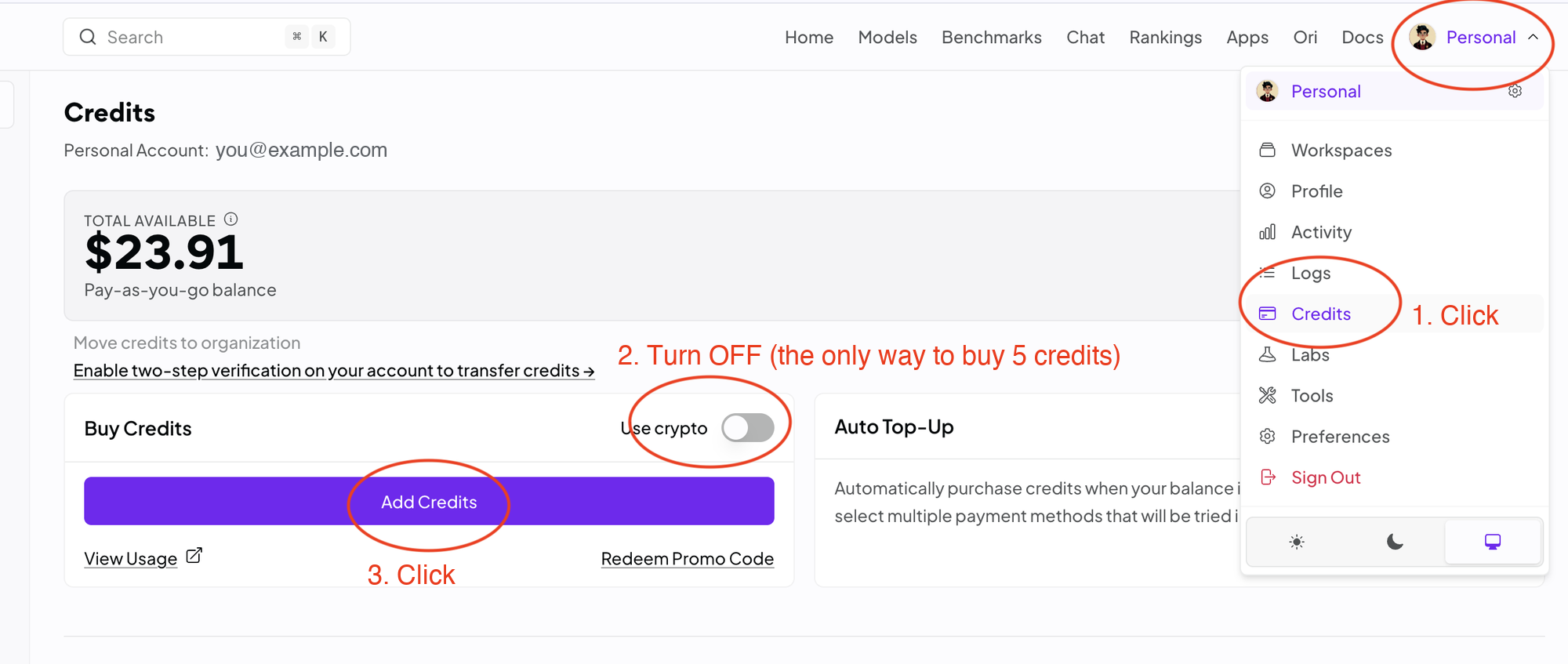
Steps 1 to 3: open Add Credits with Use crypto turned off
- Open the account menu at the top right and click Credits.
- Turn the Use crypto switch OFF. With it on, OpenRouter opens the Coinbase checkout, which refuses anything under $10.
- Click Add Credits.
With Use crypto off, the button opens OpenRouter's Stripe purchase form. It looks like the card form, but it also offers a Crypto payment method, and it accepts $5.
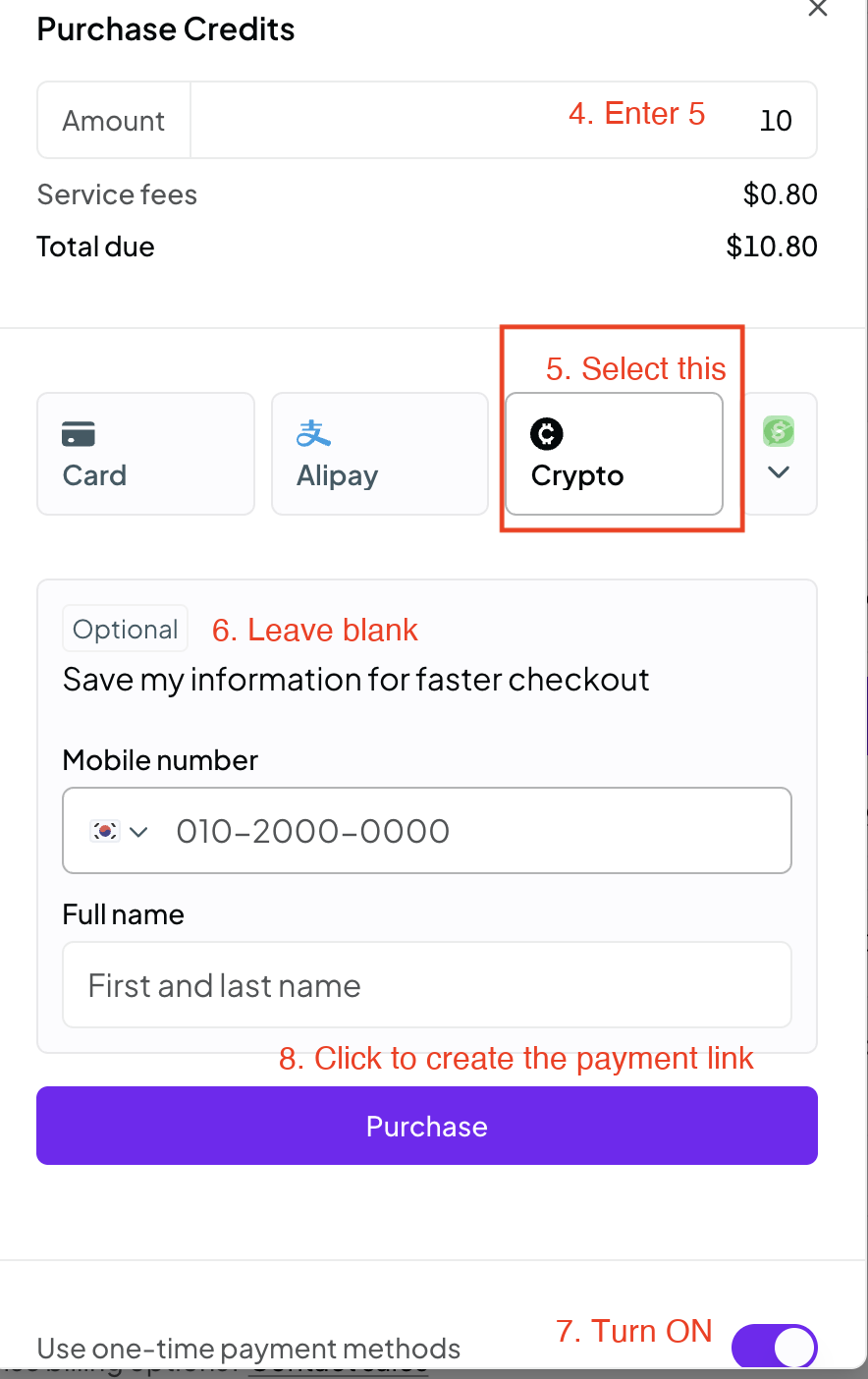
Steps 4 to 8: pick Crypto in the Stripe form and create the link
- In Amount, enter 5.
- Under the payment methods, select Crypto. If it is not visible, open the dropdown at the end of the row.
- Leave the optional Save my information for faster checkout section empty. It is Stripe Link and is not needed.
- Make sure Use one-time payment methods at the bottom is switched ON.
- Click Purchase. Stripe creates a crypto payment page for the order, with an address that starts with crypto.stripe.com/pay/.
The screenshot still shows the default amount of 10. Once you type 5, Total due changes to $5.80, or more if Stripe adds tax for your country.
Step 9: pay the Stripe link with the coin you hold
The Stripe crypto page takes USDC from a connected wallet on the networks it lists. If you already hold USDC on one of them, you can pay it there directly.
If you hold something else, copy the crypto.stripe.com/pay/ link and paste it into checkout.rozo.ai. ROZO reads the amount from the link and lets you pay with Bitcoin over Lightning, USDC or USDT on Solana, BNB Chain, Ethereum or Polygon, or USDC on Base or Stellar. Credits reach your OpenRouter account once the Stripe invoice settles, usually within about 30 to 90 seconds.
ROZO charges a 1% service fee on the link amount, shown before you send anything. The chain's own network fee is separate. ROZO is independent and not affiliated with OpenRouter, Stripe or Coinbase.
What $5 costs on this path
- Credits: $5.00
- OpenRouter fee: $0.80 (the Stripe path charges 5.5% with a $0.80 minimum, and 5.5% of $5 is only $0.28)
- Stripe link: $5.80 before tax
Treat $5.80 as the floor, not the final price. This is a Stripe checkout, and Stripe may add sales tax or VAT depending on your country and billing details, so the link can come out higher than $5.80. The markup is therefore not the 5% you may expect from crypto: it is at least 16%, plus any tax. Check Total due in the form and the amount on the Stripe crypto page before you pay. ROZO settles exactly the amount on the link, tax included.
You pay this because the Coinbase path, at 5% with no floor and no Stripe tax, will not issue a link under $10. If you can top up $10, the Coinbase path costs $10.50 and is cheaper per dollar. The $10 minimum explainer linked below has the full comparison.
If Crypto does not appear
- Use one-time payment methods is off: switch it on and look for Crypto again.
- You opened the form with Use crypto on: close it, switch Use crypto off and click Add Credits again.
- Stripe did not offer Crypto for your account: Stripe decides which payment methods to show. In that case the $10 Coinbase path is the crypto option left.