
This page covers what to check first on the card path, and how to top up without a card if you already hold crypto: OpenRouter turns a top-up into a crypto payment link, and ROZO Checkout lets you pay that link with USDT or USDC on BNB Chain, Solana, Polygon and other networks, or with Bitcoin over Lightning. No ROZO account and no KYC form on our side.
ROZO is independent and is not affiliated with OpenRouter or Coinbase.

What readers in Indonesia report
One reader this month tried two regular Visa cards from Indonesian banks, not prepaid and not virtual. Both returned "card declined". The bank confirmed the card was not blocked, the billing address matched the bank's records, and no VPN was in use.
That is a user report, not an official explanation. We do not know why those cards were refused, and only the card issuer and the payment processor can say. What it does tell you is that retrying the same card is unlikely to change the result.
First: what to check on the card path
If you would rather keep paying by card, these steps cost nothing:
- In your bank app, check that online and international transactions are switched on for the card.
- Make one attempt with any VPN off and the billing address copied exactly from your bank.
- If it fails twice, stop for the day. Repeated failures can trigger further limits.
- Try a different kind of card, ideally a credit card from another bank, rather than a second card of the same kind.
If none of that works, OpenRouter's crypto option does not use the card rail at all.
Step 1: get your OpenRouter payment link
- In OpenRouter, open Settings, then Credits.
- Turn on the crypto option, enter the amount ($10 or more) and click Purchase.
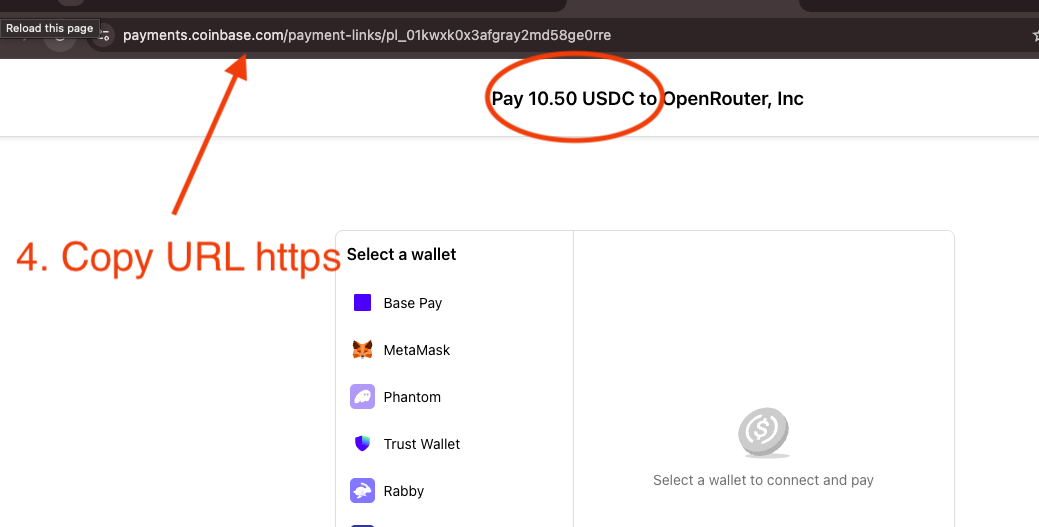
- Copy the payment link it produces, or just the payment ID: it looks like pl_01kyaaevc7evgt9.
- Paste it at checkout.rozo.ai.
The order is priced in USD, so the amount does not move with the coin you pay with. The link has its own expiry, so create it when you are ready to pay.
Step 2: pay with the coin you already hold
USDT or USDC on BNB Chain (BEP-20): connect MetaMask, Rabby or Trust Wallet. Keep a little BNB for gas.
USDT or USDC on Solana: connect Phantom, Solflare or Backpack and approve in your wallet. Keep a little SOL for the network fee.
USDT or USDC on Polygon or Arbitrum: send from your wallet, or withdraw from an exchange, to the one-time deposit address the payment page shows.
USDC on Base or Stellar: same deposit-address flow. On Base and Stellar only USDC is accepted, not USDT.
Bitcoin over Lightning: pay the QR invoice from any Lightning wallet. Lightning only, not on-chain Bitcoin.
USDC and USDT on Ethereum work too, but Ethereum gas is disproportionate on a $10 to $20 top-up.
If your USDT is on an Indonesian exchange or on Tron
Tron is not accepted, and that includes TRC-20 USDT. Sending Tron USDT to a deposit address on another network does not settle the payment.
If your USDT or USDC sits on an exchange, withdraw it on a network the checkout accepts, such as BNB Chain (BEP-20), Solana or Polygon, either to your own wallet or straight to the deposit address the payment page shows. Exchanges differ in which networks they offer for withdrawals and some only allow withdrawals to addresses you have verified, so check both in your exchange before you start the payment.
If you do not hold any crypto yet, buying it usually means an exchange account with identity verification. That step is outside what this page covers, and you should check the rules that apply to you in Indonesia before you pay.
What the checkout shows before you pay
- The merchant and the invoice amount from your OpenRouter link.
- ROZO's 1% service fee, shown before you pay. OpenRouter's own crypto fee, around 5% as listed on OpenRouter's FAQ at the time of writing, is already inside the link amount.
- The exact amount to send in the coin you picked, or the Lightning invoice in sats. Paying with Bitcoin over Lightning includes an FX spread on the BTC price, built into the sats amount.
- Live status once you have paid. Credits usually arrive in roughly 30 to 90 seconds after the payment confirms; on Lightning, allow about 2 minutes.
The network fee for sending your coin is separate and goes to the network, not to ROZO. Do not pay a second time while you wait: a confirmed crypto payment cannot be reversed. If credits do not arrive, send the transaction hash to support with your OpenRouter payment link.