
The card is not the only way in. OpenRouter also turns a top-up into a crypto payment link, and ROZO Checkout lets you pay that link with the coin you already hold: Bitcoin over Lightning, USDT or USDC on Solana or BNB Chain, or USDC on Base or Stellar. No card, no ROZO account and no KYC form on our side.
ROZO is independent and is not affiliated with OpenRouter or Coinbase.

Why the card checkout does not work for you
We are not going to guess at the reasons behind a decline; only the card issuer and the payment processor can say why a specific card is refused. What readers in Russia report is consistent: the card form rejects the card, retrying does not help, and there is no setting on OpenRouter's side that changes it.
So the practical question is not how to get the card through, but how to pay without one. OpenRouter's crypto option does not touch the card rail at all.
Step 1: get your OpenRouter payment link
- In OpenRouter, open Settings, then Credits.
- Turn on the crypto option, enter the amount ($10 or more) and click Purchase.
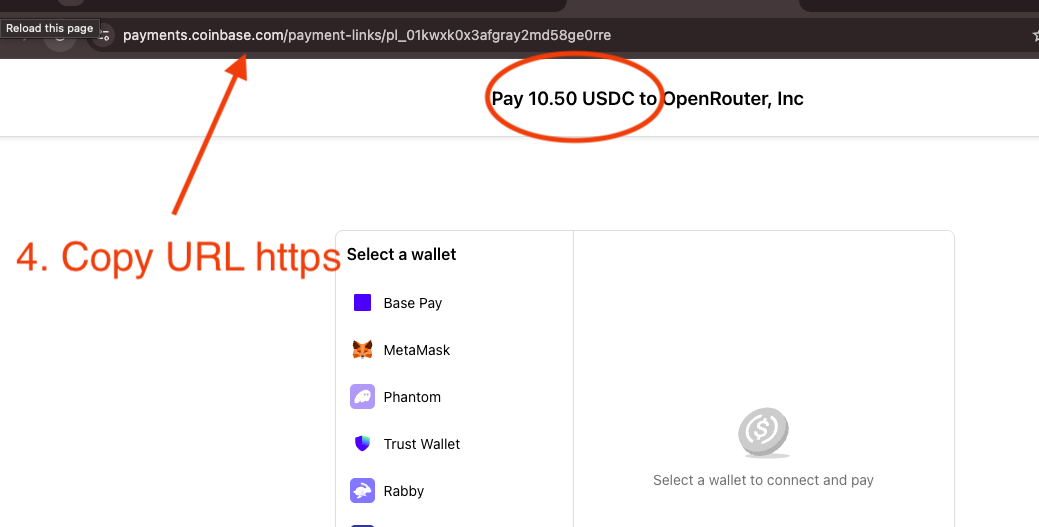
- Copy the payment link it produces, or just the payment ID: it looks like pl_01kyaaevc7evgt9.
- Paste it at checkout.rozo.ai.
The order is priced in USDC, so the USD value is fixed whichever coin you pay with. The link has its own expiry, so create it when you are ready to pay.
Step 2: pick the coin you already hold
Bitcoin over Lightning: pay the QR invoice from any Lightning wallet, such as Wallet of Satoshi, Phoenix or Breez. Lightning only, not on-chain Bitcoin.
USDT or USDC on Solana: connect Phantom, Solflare or Backpack and approve in your wallet. Keep a little SOL for the network fee.
USDT or USDC on BNB Chain (BEP-20): connect MetaMask, Rabby or Trust Wallet. Keep a little BNB for gas.
USDC on Base or Stellar: send USDC from your wallet, or withdraw it from an exchange, to the one-time deposit address the payment page shows. On Base and Stellar only USDC is accepted, not USDT.
USDC and USDT on Ethereum, Polygon and Arbitrum work too, but Ethereum gas is disproportionate on a $10 to $20 top-up. Native ETH, BNB and SOL are also accepted; a native coin order includes an FX spread on the coin price, built into the coin amount.
If your USDT is on Tron (TRC-20)
Tron is not accepted, and that includes TRC-20 USDT. Sending Tron USDT to a deposit address on another network does not settle the payment.
If your USDT sits on an exchange, withdraw it on a supported network instead: choose BNB Chain (BEP-20) or Solana as the withdrawal network, either to your own wallet or straight to the deposit address the payment page shows. Some exchanges only allow withdrawals to addresses you have verified, so check that first.
If it sits in a Tron wallet, move it to an exchange first and withdraw it from there on BNB Chain or Solana.
What the checkout shows before you pay
- The merchant and the invoice amount from your OpenRouter link.
- ROZO's 1% service fee, shown before you pay. OpenRouter's own crypto fee, around 5% as listed on OpenRouter's FAQ at the time of writing, is already inside the link amount.
- The exact amount to send in the coin you picked, or the Lightning invoice in sats. Paying with Bitcoin over Lightning includes an FX spread on the BTC price, built into the sats amount.
- Live status once you have paid. Credits usually arrive in roughly 30 to 90 seconds after the payment confirms; on Lightning, allow about 2 minutes.
The network fee for sending your coin is separate and goes to the network, not to ROZO. If the token you picked does not cover the order, the checkout tells you before you sign and you can switch to another one.
Is it safe?
On the wallet-connect routes (Solana and BNB Chain) your keys never leave your wallet, and nothing moves until you confirm. On Lightning you see the exact amount in sats before you pay. On the deposit-address routes, send on exactly the network the payment page shows.
ROZO Checkout holds no balance for you and needs no account, so there is no stored balance to freeze. Do not pay a second time while you wait: a confirmed crypto payment cannot be reversed. If credits do not arrive, send the transaction hash or Lightning payment record to support with your OpenRouter payment link.
ROZO is independent and is not affiliated with OpenRouter or Coinbase. Check the rules that apply to you where you live before you pay.