
A ROZO deposit address is created fresh for each payment and is not your wallet, so the route that works is two steps: withdraw to a wallet you own, then pay OpenRouter from that wallet through ROZO Checkout. This guide covers which coin to use from each exchange and how long each step can take.
What each exchange can send that ROZO accepts
From each exchange's official fee page or public API, checked 1 November 2026. Fees change, so read the fee on the withdrawal screen.
| Exchange | Coins and networks ROZO accepts | Withdrawal fee |
|---|---|---|
| Upbit | USDC on Solana or Ethereum, SOL, ETH on Ethereum, POL on Polygon | USDC on Solana 0.7, SOL 0.009, POL 0.25 |
| Bithumb | USDC on Ethereum, SOL, ETH on Ethereum or Arbitrum, BNB on BNB Chain, POL | SOL 0.009, BNB 0.001, USDC on Ethereum 1 |
| Coinone | USDC on Solana, SOL, ETH on Ethereum, BNB, POL | USDC 1, SOL 0.03, BNB 0.001 |
| Digital X (Korbit) | USDC on Base, Arbitrum or Ethereum, USDT on Ethereum, ETH on Base, Arbitrum or Ethereum, SOL, BNB, POL | USDC on Base or Arbitrum 0.02, SOL 0.009 |
None of them sends Bitcoin over Lightning. USDT from Upbit and Bithumb goes out on TRON, which ROZO handles on a separate Alpha route at checkout.rozo.ai/tron with its own limits.
For a typical top-up, USDC on Solana (Upbit, Coinone), USDC on Base (Digital X) or SOL are the simplest choices.
The Travel Rule step: why you send to your own wallet first
- Every withdrawal address has to be registered and reviewed before use. Bithumb says the review can take up to 7 business days, and Bithumb and Coinone ask for a screenshot of the receiving service.
- From 1,000,000 KRW per withdrawal, Upbit, Coinone and Digital X only send to a partner exchange or to a wallet verified as your own. Upbit verifies by a second channel and a wallet signature.
- Upbit blocks withdrawals to exchanges or services that are not declared, and ROZO is not on any Korean exchange's partner list.
- After your first KRW deposit, Upbit, Bithumb and Coinone hold withdrawals for 72 hours, and later deposits lock the same amount for 24 hours.
A ROZO deposit address expires with its quote, so it cannot wait out a review. Never register it as your own wallet: it is not, and that would be a false declaration.
Step by step: exchange, your own wallet, then ROZO
- Set up a wallet you control, for example Phantom for USDC or SOL on Solana, or MetaMask for USDC on Base.
- On your exchange, register that wallet as your own and complete the exchange's verification. Then withdraw the coin to it. Waiting periods happen here, before any payment exists.
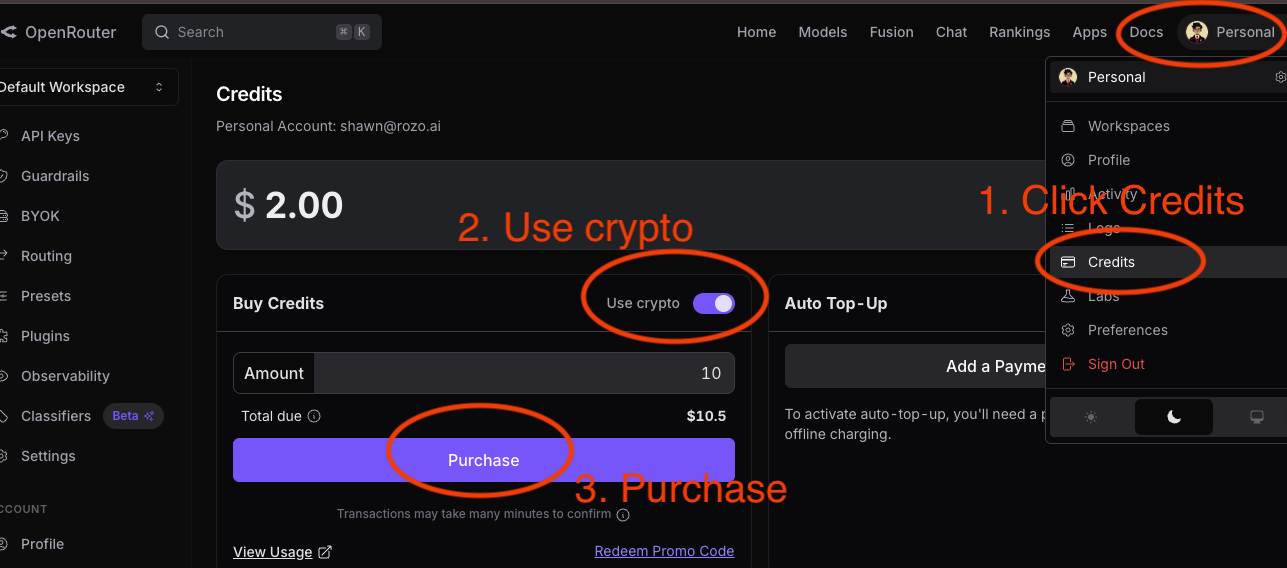
- In OpenRouter, open Settings then Credits, turn on the crypto option, enter the amount and click Purchase. Copy the payment link.
- Open checkout.rozo.ai, paste the link, and pick the same coin and network, for example USDC on Solana. ROZO shows a one-time deposit address and the exact amount.
- Send exactly that amount from your wallet. Keep a little SOL (or ETH on Base) for the network fee.
- Once the transfer lands, ROZO settles the OpenRouter link. The ROZO payment page shows live status until it does.
What it costs
- OpenRouter's own crypto fee, around 5% as listed on OpenRouter's FAQ at the time of writing, is already inside the payment link amount.
- ROZO charges a 1% service fee, shown before you send. A native coin such as SOL or ETH also carries an FX spread on the coin price, built into the coin amount.
- Your exchange charges its withdrawal fee, and your wallet pays a small network fee for the final send.
ROZO is independent and is not affiliated with OpenRouter, Coinbase or any exchange named here. There is no ROZO account and no KYC form on our side. Your exchange's own checks still apply.