
You can still use OpenRouter, a widely used AI router, with Bitcoin: OpenRouter turns a crypto top-up into a payment link, and ROZO Checkout lets you pay that link with Bitcoin over the Lightning Network. Credits land in your own OpenRouter account, usually in about 2 minutes.
This page covers how to check what an AI API really accepts before you send anything, the ways to pay an API with Bitcoin when it does not take BTC, and the exact steps for OpenRouter. Checked on 10 November 2026. ROZO Checkout is an independent third-party checkout and is not affiliated with OpenRouter or Coinbase.
Why "accepts crypto" rarely means Bitcoin
AI APIs charge for usage in dollars. Taking a card is the default, and when a provider adds crypto it usually adds the coins that hold a dollar value: stablecoins. A stablecoin top-up is easy to price and easy to reconcile, so that is what most hosted crypto checkouts offer first.
OpenRouter is a typical example. Its FAQ lists major credit cards and crypto payments in USDC at the time of writing, and its crypto option creates a payment link on a Coinbase-hosted checkout. Bitcoin and Lightning are not on that list.
So when someone asks which AI router takes Bitcoin, the honest answer is that the router usually does not, but the payment link it produces can be paid with Bitcoin through a checkout that accepts Lightning and settles the stablecoin side for you.
How to check what an AI API actually accepts
Before you move any coins, read the billing page of the API itself, not a forum post or a comparison list. Look for these five things:
- The exact asset. "Crypto" may mean only USDC or USDT. Bitcoin is a different asset and is not interchangeable.
- The network. A stablecoin on the wrong network does not arrive. Our guide to Which network for USDC shows how to read this on a payment page.
- On-chain Bitcoin or Lightning. They are different payment methods, and a wallet that only sends on-chain cannot pay a Lightning invoice.
- The minimum. Crypto top-ups often have a higher minimum than cards. OpenRouter's crypto option asks for at least $10 at the time of writing.
- Refunds. OpenRouter's FAQ says crypto payments are never refundable, so treat every crypto top-up as final.
If the page lists only cards and stablecoins, the API does not accept Bitcoin directly. That does not mean you cannot pay it with Bitcoin.
Three ways to pay an AI API with Bitcoin
- The API takes Bitcoin itself. Pay it directly and you are done. This is the rare case.
- The API produces a crypto payment link for a stablecoin. Pay that link from a checkout that accepts Lightning and settles the stablecoin for you. This is how ROZO Checkout handles OpenRouter, and it is the only route here where you pay in sats in one step and the credits land in the account you already have.
- The API takes cards only. A crypto checkout cannot pay a card-only API, so this route is outside what ROZO does.
For a longer comparison of Bitcoin routes for AI, including ecash, see Pay for AI with Bitcoin, Lightning, and Cashu. The rest of this page is about route 2, because it is the shortest path from BTC to usable AI credits for most people.
Top up OpenRouter with Bitcoin over Lightning
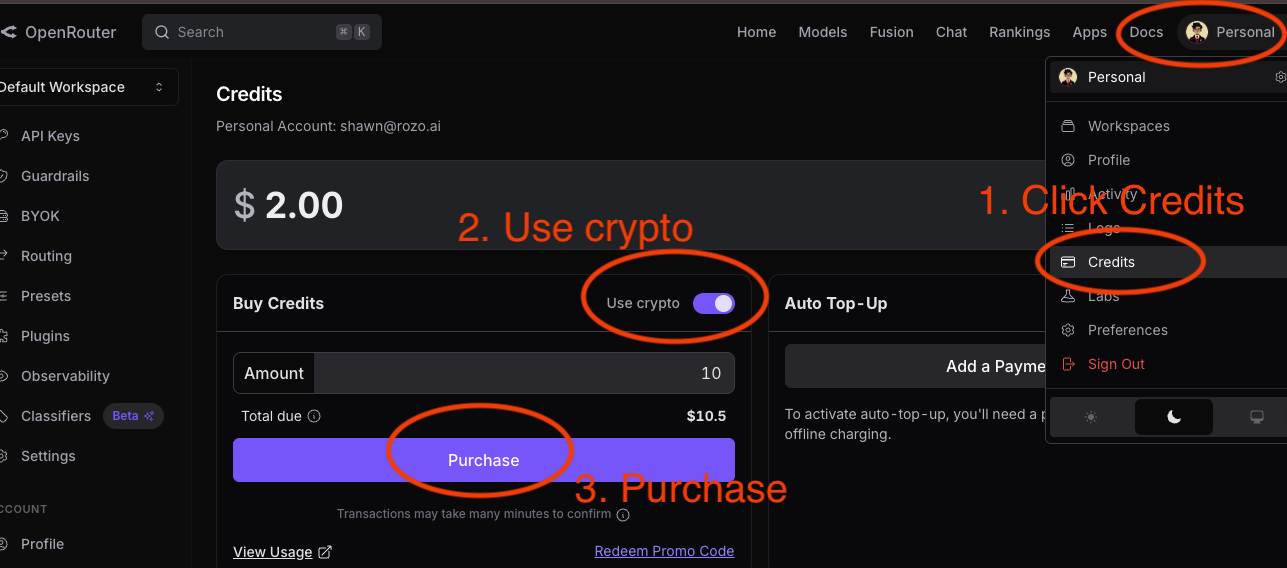
- In OpenRouter, open Settings then Credits, choose the crypto option, enter at least $10 and copy the payment link it creates.
- Open checkout.rozo.ai and paste the link. Check the merchant and the amount.
- Tap Pay with Bitcoin Lightning. A Lightning invoice appears with the exact amount in sats.
- Scan it with your Lightning wallet, or copy the invoice into a desktop wallet or your own node.
- Confirm in your wallet. Credits usually arrive in your OpenRouter account in about 2 minutes.
Two things to keep in mind. It must be a Lightning payment, not an on-chain Bitcoin transaction. And the invoice expires after about 60 minutes, because the sats amount is fixed when it is created. If it lapses, reload the checkout and pay the fresh invoice.
The full walkthrough with screenshots is in Pay OpenRouter with Bitcoin (Lightning).
What it costs
- OpenRouter's own crypto fee is already inside the payment link amount.
- ROZO charges a 1% service fee, shown before you pay.
- The BTC price used for the invoice includes an FX spread, built into the sats amount you see before paying.
- Your wallet pays a small Lightning routing fee to the network, not to ROZO.
The price is locked once the invoice is created, so Bitcoin moving while you scan does not change what you owe.
Why one router balance helps when you pay with Bitcoin
Paying in Bitcoin is the hard part, so it makes sense to solve it once. An OpenRouter balance can be spent across many models from different providers through one API key, so a single Lightning top-up covers whichever model you call next. You do not need a separate Bitcoin route for each AI provider.
If you hold stablecoins or other coins as well, the same checkout also accepts USDC or USDT on Solana, BNB Chain, Polygon and other networks, USDC on Base, plus native coins such as SOL and ETH. For typical top-up sizes, Lightning, Solana, Base and BNB Chain keep network costs low. Ethereum works too, but its gas fee is large next to a $10 to $20 top-up.
ROZO is independent and is not affiliated with OpenRouter or Coinbase. ROZO never asks for your OpenRouter login or API key.