
Paste your OpenRouter payment link into ROZO Checkout, pick the coin and network you will withdraw from MEXC, and ROZO shows a one-time deposit address with the exact amount. Withdraw from MEXC to that address. When the transfer lands, ROZO pays the original OpenRouter invoice for you.
Which MEXC network to pick
MEXC's fee page (checked 1 November 2026) lists these withdrawal networks that ROZO also accepts. Fees change, so read the fee on MEXC's withdrawal screen before you confirm.
| Coin and network on MEXC | MEXC fee | MEXC minimum |
|---|---|---|
| USDT on BNB Chain (BEP20) | about 0.01 USDT | about 0.2 USDT |
| USDT on Polygon | about 0.0065 USDT | about 5 USDT |
| USDT on Arbitrum | about 0.05 USDT | about 1 USDT |
| USDT on Solana | about 0.18 USDT | about 10 USDT |
| USDC on Arbitrum | about 0.0033 USDC | about 0.5 USDC |
| USDC on Polygon | about 0.011 USDC | about 1 USDC |
| USDC on BNB Chain (BEP20) | about 0.1 USDC | about 10 USDC |
| BTC over Lightning | a few sats | very low |
For USDT, BNB Chain is the natural pick: a fee of about one cent and a low minimum. Ethereum is also listed but is not recommended for small payments.
Step by step: MEXC to OpenRouter credits
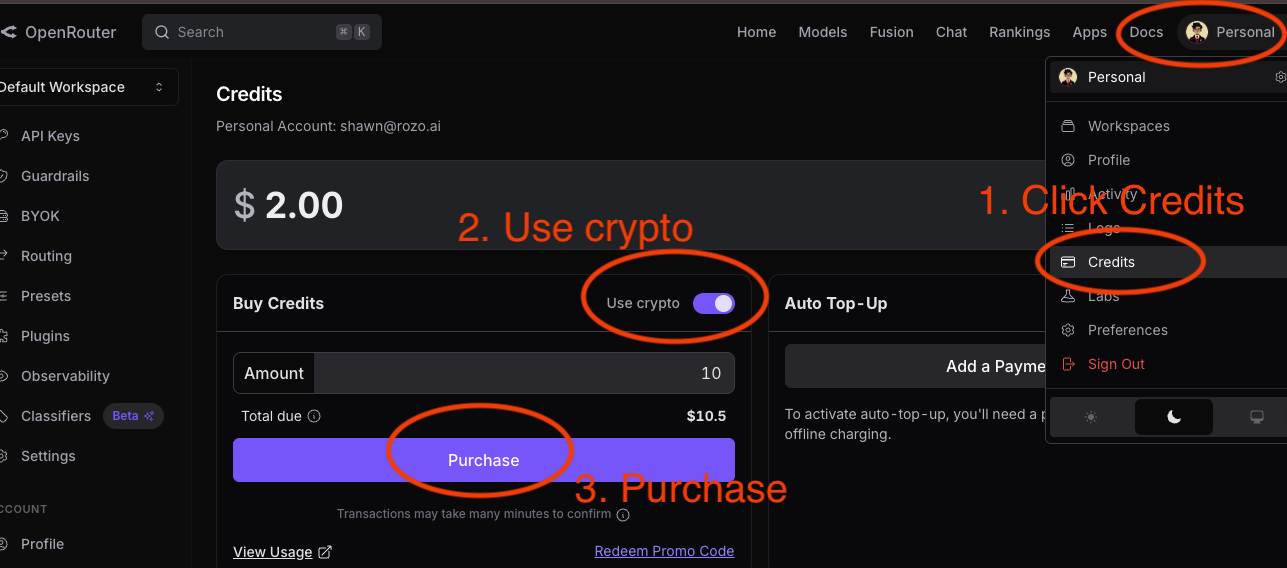
- In OpenRouter, open Settings then Credits, turn on the crypto option, enter the amount and click Purchase. Copy the payment link it generates.
- Open checkout.rozo.ai, paste the link, and pick the same coin and network you will use on MEXC, for example USDT on BNB Chain. ROZO shows a one-time deposit address and the exact amount to send.
- In MEXC, open Withdraw, choose the coin, paste the ROZO address, and select the matching network.
- Make sure the amount that arrives equals the amount ROZO shows. MEXC shows its fee before you confirm.
- Confirm the withdrawal. Once the transfer lands, ROZO settles the OpenRouter link. The ROZO payment page shows live status until it does.
Two MEXC holds to know before you start
Withdrawal whitelist: MEXC's help pages (checked 1 November 2026) say that with the address whitelist turned on, a newly added address can only be used after 24 hours. A ROZO deposit address is new every time and expires with its quote, so with the whitelist on, the withdrawal will not arrive in time. Turn the whitelist off for this payment, or pay from a wallet you control.
Crypto bought with fiat: per MEXC's withdrawal policy (checked 1 November 2026), crypto bought with a fiat deposit can be held for 24 to 72 hours. Your MEXC withdrawal screen shows the actual release time; wait until it has passed before you create the ROZO payment.
Three mistakes that cost money
Network mismatch: the network you pick in MEXC must be the same one you picked on the ROZO page. Check the selector before you confirm.
Short amount: the amount that arrives must equal the amount ROZO asked for. If MEXC takes its fee out of the amount you type, add the fee on top.
Sending late: a one-time deposit address belongs to one quote and expires with it. If the withdrawal is held and the ROZO window is about to run out, get a fresh quote instead of sending late. Never reuse a deposit address from an earlier attempt.
Memo or tag: deposits to ROZO on Solana, BNB Chain, Polygon, Arbitrum, Base and Ethereum do not use one. Leave that field empty.
What it costs
Three fees, each shown before you pay:
- OpenRouter's own crypto fee, around 5% as listed on OpenRouter's FAQ at the time of writing, is already inside the payment link amount.
- ROZO charges a 1% service fee, shown before you send anything.
- MEXC charges its own withdrawal fee, shown on its withdrawal screen.
ROZO is independent and is not affiliated with OpenRouter, Coinbase or MEXC. There is no ROZO account, no card and no KYC form on our side. Whatever checks MEXC applies to withdrawals still apply.